
How to Create a Press Kit for Your Etsy Shop (What to Include)

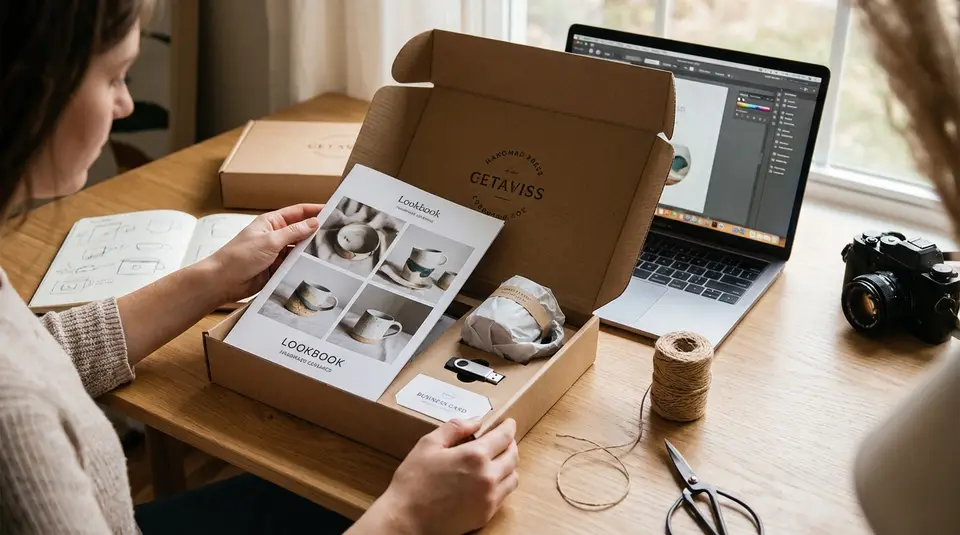
An Etsy press kit is a tidy, ready-to-send bundle of details and images that makes it easy for media, bloggers, and potential collaborators to feature your work accurately. Keep it focused: a short brand story and maker bio, a simple product overview with a few best-seller links, and clear contact info for quick follow-ups. Add high-resolution photos, logo files, and a brief usage note so people know what name to use, how to credit images, and where to find your shop. Most kits fall flat for one surprisingly fixable reason: the assets are there, but they are impossible to grab in under a minute.
Press kit vs media kit for an Etsy shop
What journalists expect to receive
A press kit is built for editorial coverage. Think: a reporter writing a story, a gift guide editor pulling products for a roundup, or a blogger needing clean facts fast. A media kit is often more advertising-focused, and it usually highlights audience size, sponsorship packages, rates, and deliverables.
For an Etsy shop, a press kit should help someone feature you without chasing you for basics. Most journalists and editors expect:
- A short, paste-ready shop description (one or two versions: 25 words and 75 to 100 words).
- Clear contact details (email is best), plus your Etsy shop link and social links.
- A small set of “hero” products with prices, materials, dimensions, and what makes them notable.
- High-resolution photos they can download quickly, with simple credit guidance.
- Availability notes that prevent errors (made-to-order lead times, limited drops, seasonal items).
If you want to include media kit info (like collaboration rates), keep it separate or clearly labeled. Many editorial teams do not need it, and it can distract from the story.
Digital folder, PDF, or web page options
The best format is the one that removes friction. For most Etsy sellers, that means choosing something fast to open, easy to skim, and easy to download.
- Digital folder (recommended for assets): Great for photos, logos, and headshots. Keep it public (no login), organized by folders, and use clear file names.
- PDF (recommended for quick reading): Good for your one-page overview, boilerplate, and product highlights. Keep it lightweight so it downloads quickly.
- Web page (recommended for discoverability): Ideal for a clean “Press” page that summarizes everything and points to your downloadable folder and PDF.
A simple combo works well: one short web page for the overview, plus a public folder for images. This keeps your Etsy press kit skimmable and your assets instantly usable.
Why a press kit helps Etsy shops get featured
Faster press replies and fewer follow-up questions
Press moves fast. If an editor emails you for “a couple photos and a quick description,” they usually need everything in one go. An Etsy press kit lets you respond in minutes with a single link, instead of digging through old images, rewriting your shop story, or hunting for exact product dimensions.
It also reduces the kinds of mistakes that happen when someone is rushing. With a press kit, you can hand over the details you want quoted: your shop name, where you’re based, correct product names, pricing, and how to credit photos. That means fewer back-and-forth messages like “Do you have this in a different color?” or “What’s the material?” and fewer last-second surprises.
A practical bonus: building a press kit often forces you to standardize your assets. If your press images match Etsy’s own image best practices (file type, size, and clarity), they are easier to reuse everywhere, from press features to your listings. Etsy’s guidance on Requirements and Best Practices for Images in Your Etsy Shop is a solid reference point when you’re choosing what to export and share.
Better chances for gift guides and roundups
Gift guides and product roundups are usually built under tight deadlines. Editors need a clean product shot, a short description, and a price they can trust. If any of that is missing, they often move on to the next option.
A strong Etsy press kit makes you “easy to include.” It highlights a few bestsellers, gives clear price ranges, and explains what’s actually available right now (especially if you sell made-to-order or limited drops). When you include lead times, shipping origin, and quick product bullets, you help editors confidently pick your item for seasonal guides without worrying it will arrive late or sell out immediately.
What to include in an Etsy shop press kit
Brand basics: shop name, location, links, contact
Start with the facts an editor needs to identify you correctly, fast. Use the exact shop name as it appears on Etsy, plus the pronunciation if it’s not obvious.
Include:
- Shop name and short tagline (optional).
- Location (city, state/province, country). If you prefer privacy, list a region (for example, “Portland, Oregon area”).
- Links: your Etsy shop homepage, 2 to 3 best listing links, and your main social profile.
- Press contact: a dedicated email (best), plus your preferred name and role (Founder, Maker, Studio Owner).
- Response window: something simple like “Replies within 1 to 2 business days,” and your time zone.
Short bio and boilerplate editors can paste
Give editors two copy-and-paste blocks: a short maker bio and a slightly more “brand” boilerplate. Keep both written in third person. Make them specific enough to sound real, but broad enough to fit different story angles.
A good boilerplate usually covers: what you make, what makes it distinct, where it’s made, and one detail that signals credibility (years in business, materials focus, small-batch process, etc.). Avoid superlatives you can’t prove.
Product info editors need: bestsellers, materials, sizes, pricing
Make a “quick pick” list of 3 to 6 items you want featured most. For each, include the details that prevent follow-up questions:
- Product name (match your Etsy listing name closely)
- One-sentence description (what it is and who it’s for)
- Materials and key features (hypoallergenic, food-safe finish, recycled content, etc., only if accurate)
- Dimensions or size range, plus color/variation notes
- Price (and what’s included at that price)
- Production style: ready-to-ship vs made-to-order, and typical lead time
Sample short boilerplate templates
25-word boilerplate (tight):
[Shop Name] is an Etsy shop based in [Location], creating [product type] in [materials]. Known for [signature detail], each piece is made in small batches.
50 to 75-word boilerplate (standard):
[Shop Name] is an Etsy shop from [Location] by [Founder Name], specializing in [product category]. The brand focuses on [materials/process], with a style rooted in [inspiration or design angle]. Best known for [bestseller or signature product], [Shop Name] offers [key benefit: personalization, gift-ready packaging, made-to-order options] and ships from [shipping origin].
One-line bio (for captions):
[Founder Name] is the maker behind [Shop Name], an Etsy shop in [Location] crafting [product type] from [materials].
Photos, logos, and assets: file types and image specs
Product photos and lifestyle images
For press, your images do the selling. Include a small set of “ready-to-publish” product photos and lifestyle shots, not your entire camera roll.
Aim for:
- High-resolution JPGs for photos (clean, sharp, well-lit). A practical baseline is the same standard Etsy recommends for listing photos: at least 2000 x 2000 pixels. That size is usually large enough for online features and many print layouts. Etsy also notes the supported image file types and color profile tips in its image requirements and best practices.
- Consistent background and color. Editors love a simple white or neutral background for “cutout” placements, plus 1 to 2 lifestyle images that show scale.
- Clear file names that match what you want credited (for example,
ShopName_ProductName_01.jpg).
Keep it simple: 5 to 12 strong images beat 50 “maybe” shots.
Founder headshots and workspace photos
Many features are really “maker stories,” so include:
- 1 to 2 horizontal headshots and 1 vertical option (JPG).
- A clean studio/workspace photo that feels authentic and uncluttered.
- Optional: one “in-process” image (hands making, tools on the bench) for editors who want behind-the-scenes visuals.
If you prefer privacy, skip the workspace and include an “in the wild” product lifestyle image instead.
Logo files, color palette, and usage rights
Add a small “Brand Assets” folder with:
- Your logo in PNG (transparent) for press use, plus JPG as a backup.
- A vector logo (SVG, EPS, or AI) if you have it. Many publications prefer vector for crisp scaling.
- A short color palette (HEX codes) and your preferred brand name styling.
Finally, include a one-paragraph usage note: what edits are allowed (cropping, minor color correction), your required credit line, and whether images are cleared for editorial use. If any photo includes a customer or model, only share it if you have written permission to do so.
Press-friendly product details pulled from Etsy listings
Processing times, shipping origin, and availability notes
When someone is building an article or gift guide, they pull details straight from your Etsy listings. Your press kit should mirror the same info, but in a cleaner, press-friendly format.
Include:
- Processing time range (your real-world “ships in” window). Processing time is counted in business days, and Etsy can calculate ship-by dates from your settings, so accuracy matters. Etsy’s processing time and ship-by date guidance is a good checklist for keeping this consistent across products.
- Shipping origin (where you ship from), especially if you get featured in “made in” roundups. Note if you ship from a studio, a fulfillment partner, or multiple locations, so editors do not assume.
- Availability notes like “made to order,” “limited batch,” “seasonal,” or “only available in the US.” Add a clear restock plan if you have one.
Variations, personalization, and made-to-order details
Editors hate guessing. Spell out what can change from order to order.
Add a short “Options” block for your featured items:
- Key variations (size, finish, colorways) and what’s most popular.
- Personalization rules: what can be customized, what cannot, and what you need from the buyer to start production.
- Made-to-order reality: if proofs are sent, how many revisions are included, and whether custom requests change lead times or pricing.
Wholesale inquiries and MSRP guidance for editors
If you are aiming for boutiques, magazines, or large-order clients, include a simple wholesale note so press can route the request correctly.
Keep it clear and lightweight:
- MSRP (your normal retail price) and a typical price range for the collection.
- Whether you offer wholesale, plus any basics like minimum order quantity, production lead time, and available packaging.
- One best contact method for wholesale inquiries.
If the inquiry started on Etsy, stay mindful of Etsy’s rules around checkout and fee avoidance when you move from “press coverage” to “placing an order.”
Where to host your press kit and how to link it on Etsy
One public folder plus a simple landing page
For most Etsy sellers, the easiest setup is a two-part system:
- One public, view-only folder that holds downloadable assets (photos, logos, a one-page PDF).
- One simple landing page that explains what’s inside and points to the folder.
The landing page can be a basic page on your site or a clean doc-style page. The goal is speed. Editors should understand your brand in 20 seconds, then download what they need in one click.
Keep your folder organized like a mini newsroom:
Start Here(a short “read me” with contact info and image credit)Product Photos(5 to 12 best images)Lifestyle PhotosLogosPress Sheet.pdf
Add a “Last updated” date, and avoid requiring access requests. If someone hits a permission wall, you’ve probably lost the feature.
Best places to link: About, announcements, profile links
On Etsy, prioritize spots that are easy to find and meant for your story and links:
- About section: Add your press kit landing page in the links area (Etsy calls this “Around the Web”). Etsy’s help doc on editing your shop’s About section walks through adding website and social links.
- Shop announcement: Keep it short. Add one line like “Press kit + images: [your landing page]” and a press email. This is especially helpful when someone lands on an individual listing first.
- Profile links: Make sure your Etsy profile and connected social accounts look current, since some writers will click your name before they click your shop.
Media inquiry reply template for Etsy messages
Hi [Name], thanks for reaching out!
Here’s my Etsy press kit with photos, logos, and product details: [press kit link].
Quick basics: I’m [Name], the maker behind [Shop Name] in [Location]. My best known items are [1 to 2 products].
A couple quick questions so I can help fast: What’s your deadline, and which product(s) are you considering? If you need specific image sizes or a quote, tell me your specs and I’ll send the best options.
Best contact for press: [email]. If you plan to purchase, please use Etsy checkout so everything stays tidy on both sides.
Keeping your press kit current and avoiding common mistakes
Update cadence, versioning, and “Last updated”
A press kit that’s six months out of date is worse than no press kit. It creates extra work for editors and can lead to incorrect pricing or shipping expectations.
A simple cadence works for most Etsy shops:
- Quarterly refresh for evergreen products and brand info.
- Monthly check during peak seasons (especially Q4), or anytime you change processing times, pricing, or bestsellers.
Add a clear “Last updated” line on your landing page and in your PDF. Use basic versioning so you always know what’s current. For example: PressKit_ShopName_2026-02-20.pdf. Keep older versions in an archive folder so you can roll back if needed.
Photo permissions, customer testimonials, and credit lines
Press images should be safe to publish. That means you need clear permission and clear rules.
If a photo includes a person (customer, friend, model), only include it if you have written consent to use the image for editorial promotion. If you use user-generated content, save the permission and keep the message attached to the file name or folder notes.
Also, make credit easy. Include a short line like: “Photo credit: [Name/Shop Name].” If you require a link, state it politely, but avoid making it complicated. Editors often skip assets with unclear terms.
Broken links, missing pricing, and outdated lead times
These are the most common reasons Etsy sellers miss out on features. Do a quick “editor test” once a month: open your press kit on your phone and try to grab an image in under 60 seconds.
Watch for:
- Broken links to listings (renewed items, sold-out products, renamed listings).
- Missing pricing or unclear ranges. Editors need a number they can publish.
- Lead times that don’t match Etsy. If your press kit says “ships in 1 to 3 days” but your Etsy processing time is longer, expect confusion and unhappy readers.
When something is limited or made to order, say so plainly. Clear expectations make it easier to feature you and easier for shoppers to buy with confidence.
Related posts
Keep reading

How to Protect Your Etsy Shop From Scams and Phishing
Etsy phishing scams: spot fake support messages, QR-code traps, and off-platform payment requests, then lock down your account with 2FA and spam reporting.

How to Set Up Google Analytics for Your Etsy Shop
Learn how to set up Google Analytics 4 for your Etsy shop step by step to track traffic, buyer behavior, keywords, sales funnels, and marketing performance.
How to Separate Personal and Business Finances for Your Etsy Shop
Separate personal and business finances by using a dedicated bank account and card, tracking Etsy fees and payouts, and keeping clean, tax-ready records.
How to Create a Production Workflow for Your Etsy Shop (SOP Template)
Production workflow for your Etsy shop with an SOP template: map order intake to making, QC, packing and shipping, with roles, tools, and ship-by timing.
Etsy Plus: What You Get, What You Don’t, and Who Should Upgrade
Etsy Plus ($10/mo) adds listing and Ads credits, branding tools, restock alerts and domain discounts, but not lower fees; best for active, growing shops.
How to Get Featured in Local Media as an Etsy Maker (PR Checklist)
Get featured in local media using a practical PR checklist for your Etsy shop: local story angles, press kit essentials, pitch timing, and polite follow-ups.