
How to Separate Personal and Business Finances for Your Etsy Shop

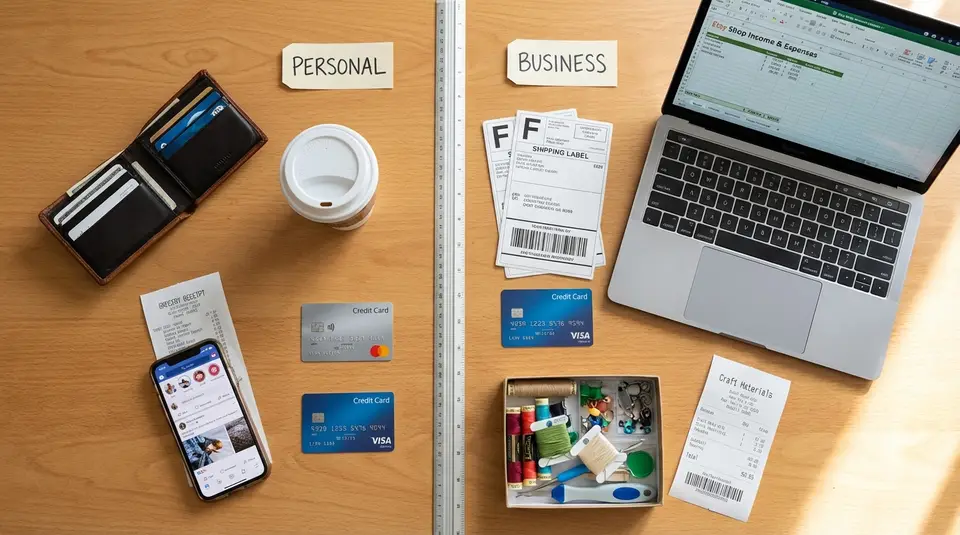
Separating personal and business finances is the fastest way to keep your Etsy shop organized, profitable, and low-stress. Start by routing every sale, fee, refund, and shipping label through a dedicated business bank account or card, then record each transaction in one bookkeeping system so your numbers match your Etsy deposits. Decide how you will move money to yourself, such as a regular transfer that covers your pay and taxes, and treat everything else as business cash. The surprise for many sellers is not the setup, it’s the tiny one-off purchases and mixed-use tools that quietly break the system.
Separate bank accounts for Etsy income and expenses
Choosing business checking vs a second personal account
Your cleanest setup is one dedicated account that is only for your Etsy shop. That can be a true business checking account, or a second personal checking account used exclusively for business.
A business checking account is often the better long-term choice if you plan to grow, apply for business credit, or add a partner. It can also reduce friction if your bank asks for clearer documentation.
A second personal account can be fine when you are early-stage and operating as a sole proprietor, as long as you keep it strictly business-only. The big rule is simple: if a transaction is for Etsy, it goes through the Etsy account. If it’s personal, it does not.
Before you choose, confirm your bank’s rules. Some banks restrict “business use” on consumer accounts.
Handling Etsy deposits and bank transfers cleanly
Etsy sales do not land in your bank instantly. They first appear in your Etsy Payment account, then Etsy sends deposits to your bank based on your deposit schedule (daily, weekly, biweekly, or monthly). That timing affects how you reconcile deposits and plan bill payments. The most practical approach is to pick a schedule you can manage consistently, then match your bookkeeping to it.
Also, plan ahead before changing bank details. When you update your bank account, Etsy applies a security hold on funds for a short period, which can temporarily slow deposits. Etsy explains the deposit flow and scheduling options in How to Receive Your Etsy Payments Deposit.
Keeping a buffer for taxes and refunds
Treat your Etsy checking balance like working capital, not personal spending money. Keep a buffer for:
- tax set-asides (income tax and, if applicable, self-employment tax)
- refunds, chargebacks, and return shipping
- slower deposit periods or temporary holds
Many sellers find it easiest to move a percentage of each deposit into a separate savings account (or a dedicated “tax” bucket) the same day the deposit arrives, so the money is there when you need it.
Business debit and credit cards to avoid mixed purchases
Picking one card for inventory, shipping, and ads
Once you have a separate bank account, the next biggest upgrade is using one dedicated card for Etsy spending. This is where most “mixed finances” problems start: a shipping label here, a quick supply run there, then you cannot tell what was personal versus business.
Pick a single business debit or credit card and run all core Etsy costs through it, such as:
- inventory and raw materials
- packaging and shipping supplies
- postage and shipping labels
- Etsy Ads, listing fees, and other shop-related charges
- equipment that is used only for your shop (label printer, scale, photo lights)
A credit card can make tracking easier because you get one clean statement and often stronger purchase protections. A debit card can be simpler if you prefer spending only what is already in the account. Either works if you stay consistent.
Paying for subscriptions and tools the right way
Subscriptions are sneaky because they renew automatically and blur into personal life fast. Put every shop subscription on the business card, including design tools, bookkeeping software, cloud storage, and email or domain services tied to your shop.
If you use a tool for both personal and business, decide on a rule and document it. For example, you might pay it personally, then reimburse yourself monthly from the business account with a note like “Canva 50% business use.” The key is consistency, not perfection.
Using employee or partner cards safely
If you have a helper, spouse, or business partner buying supplies, avoid sharing one card number. Instead, use authorized user cards or employee cards with their own logins and limits when available. Set clear boundaries upfront: what they can buy, where receipts must go, and how quickly purchases need to be recorded.
Even with extra cards, keep one “source of truth.” All Etsy-related purchases should still flow through the same account and bookkeeping system. That is what keeps your records clean when it is time to review profit, handle refunds, or prep for taxes.
Bookkeeping setup that matches Etsy fees, refunds, and shipping
Categorizing Etsy fees, shipping labels, and marketing
Etsy bookkeeping gets messy when you treat each deposit as “sales” and ignore what happened inside your Etsy Payment account. A cleaner approach is to track gross sales and then break out the costs Etsy subtracts along the way, so you can see real profit.
Common Etsy categories to map in your bookkeeping include:
- Listing fees (the $0.20 listing charge and renewals)
- Transaction fees (a percentage of the order total, including shipping you charge)
- Payment processing fees (varies by country and payment method)
- Shipping labels (if you buy labels through Etsy)
- Advertising (Etsy Ads and, if used, Offsite Ads)
Etsy spells out these fee types in its Help Center, which makes it easier to mirror your chart of accounts to Etsy’s language and reporting. A quick check of Etsy’s fees and taxes for selling on Etsy page can help you name categories in a way that matches what you actually see in Shop Manager.
Capturing receipts and linking them to transactions
Receipts are where “separate finances” turns into “clean records.” Get in the habit of saving proof for every non-Etsy purchase: supplies, packaging, equipment, and subscriptions.
Two practical rules keep this simple:
- Capture the receipt the same day you buy, and store it in one place (cloud folder or your bookkeeping app).
- Match the receipt to the exact card transaction by date and amount, then add a short note like “poly mailers” or “photo backdrop.”
This is especially important for shared-use items (like a laptop or phone accessories). If you plan to claim partial business use, the receipt and notes are what make your bookkeeping defensible later.
Reconciling deposits against Etsy payment reports
Reconciling means proving your books match Etsy and your bank. With Etsy, the key is remembering that one bank deposit can include multiple orders, refunds, fees, and label charges.
Use Etsy’s built-in reports to tie it together:
- Monthly statements show a breakdown of sales and fees for a time period and can be downloaded as a CSV.
- Deposit reporting helps explain why a specific deposit amount is what it is.
Etsy’s guidance on managing your Payment account and monthly statements is in How to Manage Your Payment Account. When you reconcile regularly (weekly or monthly), you catch issues early, like a refund you forgot to record or a shipping label that hit on a different day than expected.
Paying yourself from Etsy profits without blurring finances
Owner draw basics for sole proprietors
If you run your Etsy shop as a sole proprietor, you typically do not put yourself on payroll. Instead, you pay yourself with an owner’s draw: a transfer from your business bank account to your personal account.
Two things make this clean:
- Record the transfer as “Owner draw” (or “Owner pay”), not as an expense like supplies or shipping.
- Only draw from actual available cash, after you have accounted for Etsy fees, upcoming bills, and your tax buffer.
This is one of the simplest ways to keep your books accurate because your profit stays profit, and your personal withdrawals are clearly labeled.
Setting a predictable transfer rhythm
Consistency matters more than frequency. Pick a transfer rhythm you can keep, then stick to it, such as:
- weekly transfers on the day after your Etsy deposit hits
- twice per month on set dates
- monthly transfers after you reconcile the prior month
A predictable rhythm reduces impulse transfers, which is where finances start to blur. It also helps you spot cash flow issues early, like slower sales, heavier ad spend, or a wave of refunds. If your deposit schedule changes inside Etsy, update your transfer day to match so you are not guessing what is really available.
Separating personal reimbursements from business income
Reimbursements are the silent record-breaker for many sellers. If you buy a shipping scale on your personal card, it is tempting to just transfer “some money” to yourself later. That works until you try to reconcile and cannot explain the movement.
Instead, keep reimbursements separate and documented:
- Make a transfer labeled “Reimbursement: [item]” with the receipt saved.
- In your bookkeeping, code it as the correct expense category (supplies, equipment, shipping materials), not owner draw.
Owner draws are for paying yourself from profits. Reimbursements are repayments for business expenses you covered personally. Treating them differently keeps your Etsy shop income clear, and it makes tax time far less stressful.
Tax IDs, EIN, and seller info updates for clean records
When an EIN helps even without an LLC
An EIN (Employer Identification Number) is a federal tax ID for a business. You might not need one to start selling on Etsy, but an EIN can still be useful even if you are a sole proprietor with no LLC.
It often helps when you want cleaner paperwork, like opening a dedicated business bank account, applying for business credit, or sharing tax forms with vendors without handing out your Social Security number. It can also be required if you hire employees or change your business structure later.
If you are not sure whether you need an EIN for your specific setup, a tax pro can help you choose the right path. The goal here is simple: one identity for your shop, and consistent info across your bank, bookkeeping, and Etsy.
Updating Etsy taxpayer and business information
Outdated taxpayer details are a common cause of payout delays and messy year-end reporting. Make it a habit to update Etsy as soon as any of these change: your legal name, business name, address, or taxpayer ID type.
In Etsy, this lives in Shop Manager under your legal and tax settings. Etsy’s step-by-step guide is in How to Update Your Legal Name and Taxpayer Information, including what documents may be required for a legal name change.
Tracking sales tax and marketplace facilitator rules
Etsy is a marketplace facilitator in many places. That usually means Etsy calculates, collects, and remits sales tax on eligible orders shipped to certain states, and you cannot opt out. Those taxes may show in your order totals but do not function like “income” you get to keep, so your bookkeeping should keep them separate from product revenue.
Etsy maintains the rules and a state-by-state overview in How US State Sales Tax and Fees Applies to Etsy Orders.
When should you switch from hobby-style tracking to business finances?
Signals that it is time to separate finances fully
If your Etsy shop is still an occasional experiment, simple tracking might feel “good enough.” But the moment money starts moving regularly, separation stops being optional and starts being what keeps you sane.
A few clear signals it’s time to switch to full business finances:
- You are selling consistently each month (not just a few one-off orders).
- You are paying for materials, packaging, or ads weekly.
- You are not sure what you actually profit after fees and shipping.
- Tax time is turning into a scramble for receipts and totals.
- You are planning to scale, add new product lines, or increase ad spend.
If you recognize even two of these, separate accounts and a dedicated card will usually save more time than they take to set up.
Creating clear boundaries for shared household expenses
Shared expenses are where “hobby-style” tracking falls apart. Internet, a shared printer, a phone plan, even a room used for packing can become gray areas.
Pick one boundary rule and stick to it. For example: the business pays only for expenses that are 100% shop-related, and anything mixed-use stays personal unless you reimburse yourself with a note and receipt. The goal is not to maximize deductions. The goal is to make every transaction easy to explain later.
Avoiding cash flow surprises from holds and chargebacks
Etsy cash flow is not always smooth. Even if sales are strong, funds can be delayed by deposit timing, account reviews, or disputes. Etsy can also place a Payment account reserve where a percentage of funds from new sales is held temporarily and released later, often sooner when valid tracking shows an order is in transit. That policy is explained in Etsy’s article on a Payment account reserve.
This is why sellers who “feel profitable” still get caught short. If you are paying suppliers from your personal account or draining the Etsy balance too fast, one refund, chargeback, or reserve can create a negative balance and force a scramble. Keeping business finances separate, plus a cash buffer, turns those events into an inconvenience instead of an emergency.
Fixing tangled personal and business finances already mixed together
Sorting past transactions and documenting transfers
If your Etsy money and personal money have been mixed for a while, you do not need to “fix everything” in one weekend. You need a clean cutoff point and a clear paper trail.
Start by choosing a date to go business-only going forward. Then work backward for a limited window, like the last 2 to 3 months, and clean that up first.
As you sort, focus on three buckets:
- True business expenses (supplies, packaging, shipping, ads, tools)
- Personal spending that accidentally hit the business card
- Transfers between accounts
For transfers, add simple labels in your bookkeeping so they are explainable later: “Owner draw,” “Owner contribution,” or “Reimbursement.” If you cannot identify a transaction with reasonable confidence, flag it and move on. A small “unknown” list is better than guessing.
Cleaning up mixed-use purchases and partial business use
Handling refunds, chargebacks, and negative balances
Mixed-use purchases are easiest to fix when you decide on one consistent rule. If an item is clearly for your Etsy shop, treat it as a business expense. If it is clearly personal, treat it as personal. If it is mixed (like a phone bill, printer ink, or a shared subscription), pick a reasonable split and document it with a short note.
Refunds and chargebacks are where tangled finances can create real damage, because Etsy can pull funds back after you already transferred money out. If you see a negative balance risk:
- Pause owner draws until your Etsy account and bank balance stabilize.
- Record refunds as refunds (not new expenses) so sales reports stay accurate.
- Reconcile the specific order in Etsy first, then match it to the bank activity.
If a refund or chargeback causes a negative balance, treat any money you move in to cover it as an owner contribution, not “income.” That keeps your bookkeeping honest and your Etsy profit picture clear.
Related posts
Keep reading

What to Do Before You Open an Etsy Shop
Get ready to open a successful Etsy shop with smart product ideas, branding, pricing, photos, SEO keywords, fees, policies, and launch marketing already planned.

How to Set Up Google Analytics for Your Etsy Shop
Learn how to set up Google Analytics 4 for your Etsy shop step by step to track traffic, buyer behavior, keywords, sales funnels, and marketing performance.

How to Create a Production Workflow for Your Etsy Shop (SOP Template)
Production workflow for your Etsy shop with an SOP template: map order intake to making, QC, packing and shipping, with roles, tools, and ship-by timing.

What to Do If Your Etsy Shop Gets Suspended (First Steps)
Etsy shop suspended? Check Etsy’s email notice, protect open orders, fix billing or ID issues, and submit a clear appeal so you can reopen again smoothly.

How to Add Variations on Etsy Without Confusing Buyers
Add variations on Etsy with clear option names, linked photos, and accurate price/stock settings so buyers choose fast and orders stay correct at checkout.

What Is a 1099-K? What Etsy Sellers Need to Know
1099-K for Etsy sellers: when you’ll get one, what counts as gross sales, and how to reconcile totals with shop records at tax time, and state limits.