
How to Use Barcodes and Labels to Speed Up Etsy Fulfillment

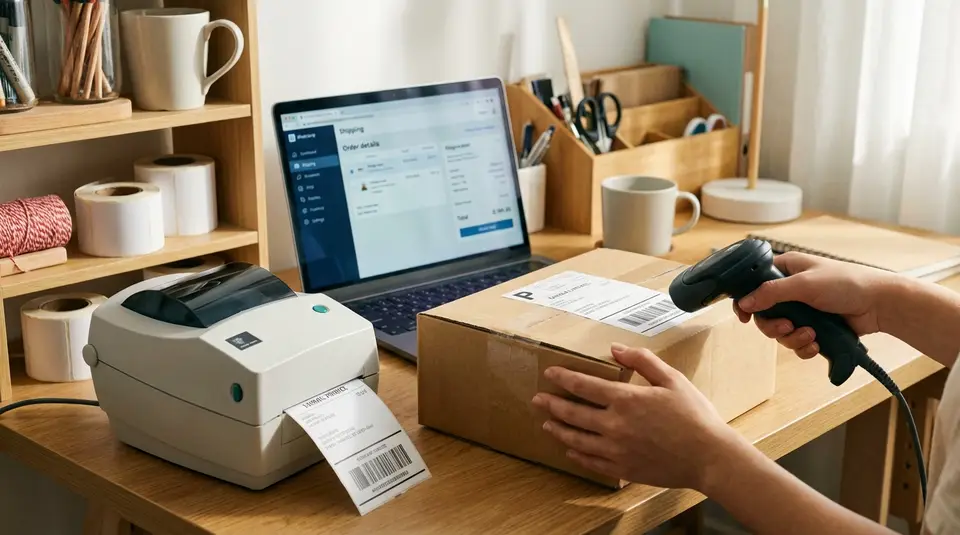
Barcode labels turn your Etsy orders into a scan-and-go workflow instead of a read-and-hunt scramble. The idea is simple: assign consistent SKUs, put small labels on products or storage bins, and print a packing slip that includes an order identifier you can scan at the packing station. With a basic barcode scanner, you can verify the right item and variant before it goes in the box, then print shipping labels only when the package is truly ready to leave. If you buy USPS postage through Etsy, a SCAN form can also speed up drop-offs by rolling many packages into one acceptance scan. The surprising bottleneck is often a tiny label decision that quietly adds extra double-checking to every order.
Barcode and label workflow for picking and packing Etsy orders
Creating pick lists with SKUs
A fast Etsy fulfillment workflow starts with a pick list that speaks your internal language: SKUs. SKUs are your short, consistent item codes (like MUG-BLK-11OZ), not the listing title that changes over time.
For each batch of Etsy orders, generate a pick list that includes:
- Order number
- Item name plus variation details (size, color, finish)
- Quantity
- SKU for each line item
- Storage location (bin/shelf code)
Even if you do not use an app, you can build this structure with a simple spreadsheet. The key is consistency: the same SKU should always mean the same product and variant, across every listing and reorder.
Scanning items to prevent packing mistakes
Scanning is where barcodes pay for themselves. Instead of visually comparing variants (which fails when items look similar), you scan to confirm the SKU you picked matches the SKU you meant to ship.
A practical flow at the packing table:
- Open the Etsy order and confirm the items to pack.
- Scan the product barcode (or the bin barcode) as you pull each item.
- Match the scanned SKU to the order line item before sealing the package.
- Only then print the shipping label, so you do not end up with a label attached to the wrong box.
This reduces the most common fulfillment errors: wrong color, wrong size, or “nearly identical” products swapped between orders.
Labeling bins, shelves, and product variants
Label storage first, products second. Start by assigning each shelf or bin a short location code (A3, B7, etc.) and printing a barcode label for that location. Then add variant labels where mistakes happen most, such as colorways, sizes, or personalization options.
For example, keep one master SKU for the base product, then add variant SKUs for each option (TEE-BLK-M vs. TEE-BLK-L). When you label at the variant level, picking gets faster, and training help is easier because the system does the checking.
Etsy Shop Manager shipping label settings that save clicks
Setting default ship-from address and package types
The fastest Etsy shipping workflow starts before you ever click “Get shipping labels.” In Shop Manager, make sure your Ship-from address is correct and consistent, so you are not editing it on every order. When you buy a label, Etsy lets you confirm the Shipping from address, and any small mismatch (suite numbers, abbreviations, old addresses) adds friction and can cause label do-overs.
Next, standardize your packaging. If you tend to ship in the same few mailers or boxes, set up package preferences in Shipping settings so you can pick from saved package sizes instead of retyping dimensions. If you use USPS labels through Etsy, you may see package presets in the label flow, but the goal is the same: fewer manual fields.
Using shipping profiles and calculated shipping
Shipping profiles are the “set it once” tool for repetitive shipping rules. When you apply a profile to listings, updates to that profile carry across every listing using it, which saves a lot of editing time when rates or services change.
If your items have predictable weights and packed dimensions, calculated shipping can reduce back-and-forth with buyers and speed up label buying because the order’s shipping details are already structured around real measurements. It does require you to keep item weight and size accurate. Etsy’s overview of calculated shipping is worth skimming if you have never set it up.
Saving preferences for label purchase and printing
Inside the label purchase flow, save a shipping preset for common package details so future labels auto-fill faster. Also set a preferred carrier if you regularly use more than one option, so Etsy prioritizes the right service first.
Finally, decide on a printing default and stick with it. Many shops streamline by printing USPS labels as 4x6 and everything else on letter paper, then keeping each printer’s settings consistent so labels come out scannable and correctly sized.
How to buy shipping labels on Etsy without retyping details
Required info for Etsy shipping labels
To buy an Etsy shipping label quickly, have your package details ready before you click into the label screen. Etsy’s label flow typically asks for the package weight, package type, and dimensions (length, width, height), then you choose the delivery service you want.
International orders add another layer. You’ll usually need accurate customs details for each item, including a description, the item value, and the item weight. If you keep these details consistent in your workflow (for example, a “standard box” preset and a saved product weight), you stop retyping the same fields all day.
One more time-saver: confirm the buyer’s address before you purchase. Etsy lets you edit the address during label purchase in supported countries, but it’s much harder to clean up after the label is already bought.
Bulk buying labels for multiple open orders
When you have a stack of open orders, buying labels one-by-one is where time disappears. Etsy supports bulk label purchasing, which is ideal for batch fulfillment: pick everything first, pack everything second, then buy and print labels in a single pass.
A practical routine is to group orders by package type (same mailer, same box size), then run label purchases as a batch. Etsy’s Seller Handbook notes you can purchase up to 20 labels at once, which is plenty for most daily shipping runs. The bulk workflow is also when USPS SCAN forms become useful, because you’re already thinking in “daily batch” terms. You can read Etsy’s guidance in the Seller Handbook article, How to Make the Most of Shipping Labels on Etsy.
Fixing a label after purchase and refunds
Plan on this rule: you can’t truly edit a label you already purchased. If the address, weight, or service is wrong, the clean fix is usually to refund the unused label and buy a new one.
Refund windows depend on the carrier. For example, Etsy’s help guidance allows refund requests within 30 days for USPS labels, and within 15 days for UPS and FedEx labels, as long as the label has not been used. Refund decisions are handled by the carrier and often take a couple of weeks to process, so it’s worth catching issues before you print and attach the label.
Printing Etsy shipping labels on 4x6 and letter paper
Choosing the right label format and printer settings
Most Etsy sellers end up using two formats: 4x6 thermal labels for speed, and 8.5x11 (letter) when they are printing on plain paper or label sheets.
In Etsy, the big thing to know is that only USPS shipping labels can be formatted for 4x6 label printers. For other carriers, plan on printing to letter paper, or download the PDF and manage sizing on your end.
For clean, scannable labels, keep these printer settings tight:
- Use the correct paper size (4x6 for label rolls, 8.5x11 for letter).
- Print at 100% scale (avoid “Fit to page” if it shrinks or clips the barcode).
- Use high print quality. Etsy recommends 600 DPI for inkjet printing.
- Always check the print preview. If the barcode looks fuzzy, stretched, or cut off, carriers may have trouble scanning it.
Etsy’s step-by-step for downloading and printing labels is in their Help Center: How to Download and Print a Shipping Label.
Printing from desktop and mobile
Desktop is usually the smoothest route because Etsy labels download as PDFs, and you can control printer settings more precisely.
On mobile, the workflow depends on your device and printer setup. In general, you will still download the label PDF, then print it using your phone’s print options. If mobile prints keep coming out “cropped,” switch to desktop for label buying and printing, then use mobile only for quick order checks.
Downloading and reprinting past labels
If you need another copy, you can download and reprint the shipping label from the order as often as needed until the label’s ship date. After that ship date passes, Etsy may require you to request a refund for the old label and purchase a new one, so it’s worth saving the PDF the day you print, especially during busy weeks.
Attaching shipping labels and packing slips for fast handoff
Label placement tips for USPS, UPS, and FedEx
No matter which carrier you use through Etsy, the goal is the same: make the label easy to scan the first time. Put the shipping label on the largest, flattest surface of the package, and keep it away from seams, edges, and curves.
A few practical rules that prevent headaches:
- Don’t wrap the label over a box corner or across a poly mailer fold. Barcodes scan best when they’re flat.
- Keep the label clear of tape seams, packing tape wrinkles, and mailer texture.
- If you reuse boxes (or use branded packaging with printed graphics), fully cover old barcodes and addresses so the wrong code cannot be scanned.
For packing slips, place them inside the package in the same spot every time (top of the order, or against the inner flap). That consistency speeds up any returns or customer support issues later.
Weatherproofing and smudge-proofing labels
If there’s any chance of rain or snow during pickup and transit, treat weatherproofing as part of your standard packing routine. Thermal labels are usually durable, but they can still scuff if they rub, and inkjet labels can smear if they get wet.
Reliable options:
- Use a clear adhesive label pouch for paper labels.
- If you tape over a label, use smooth, clear tape with no wrinkles and avoid heavy glare across the barcode area.
- On poly mailers, press labels down firmly so corners do not lift and catch on conveyor belts.
Using branded labels without covering barcodes
Branded stickers are great, but keep the shipping label “quiet.” Avoid placing branding near the barcode, routing code, or address block. If you add a thank-you sticker, put it on the opposite side of the package, or far from the shipping label.
If you include an Etsy packing slip, keep your branding there instead. It delivers the same brand moment without risking a scan failure or a carrier delay.
SKU and barcode systems that match your Etsy listings
Adding SKUs to listings and variations
Your barcode system should start in Etsy, not in a separate spreadsheet that nobody updates. Etsy lets you add a SKU in the Inventory and pricing area for simple listings, and you can also set SKUs at the variation level when you want different options (like size or color) to have their own codes. The cleanest way to confirm the exact steps is Etsy’s guide on how to use SKU for your inventory.
For fulfillment, treat SKUs as your “single source of truth.” If a buyer selects “Blue, Large,” your order should show one specific SKU that matches one specific label on the shelf. Avoid reusing the same SKU for different variants, even if the listing title is similar.
Picking a barcode type that scans reliably
Most Etsy shops do best with simple, 1D barcodes for internal use. They scan fast, print easily, and are readable from a little farther away than tiny QR codes.
A good internal barcode should:
- Encode letters and numbers (not just digits).
- Stay scannable even when printed small.
- Be widely supported by low-cost USB scanners.
Code 128 for internal SKUs and bin labels
Code 128 is a strong default for SKU barcodes and location labels because it supports alphanumeric characters and stays compact. That makes it ideal for bin labels like “B-14” and longer SKUs like “TEE-BLK-L.”
Keep a short “quiet zone” (blank space) around the barcode, and don’t cram it against the edge of a tiny sticker.
Printing product labels that stay readable
For product labels, durability matters as much as barcode choice. Pick a label size that lets the barcode print with clear lines, and reprint anything that looks fuzzy or stretched. If your items are handled a lot (jewelry cards, apparel polybags, candle tins), use labels that resist smudging, and place them where they won’t rub during packing. Consistency wins here: same SKU format, same label placement, same scan motion every time.
Automation ideas: presets, batch actions, and SCAN forms
Shipping label presets and batch printing routines
Automation starts with a repeatable batch. Aim for a daily rhythm like: pick, pack, label, handoff. When you stop bouncing between steps, you stop reopening the same Etsy screens.
Two routines that save real time:
- Package presets: Keep a short menu of “default packages” (mailer, small box, large box) with consistent dimensions. Then you only change weight when needed.
- Batch printing: Buy labels in a block after packing is complete. Then print labels and packing slips in one pass, in order. If you use barcodes internally, scan the SKU (or bin label) as the last check before the label goes on the box.
This also reduces expensive mistakes like printing a label, setting it aside, and later attaching it to the wrong package.
Using USPS SCAN forms for daily drop-offs
If you ship a lot of USPS packages, a USPS SCAN form can make drop-offs faster. It’s a single page with one barcode that USPS can scan to accept multiple packages at once.
Etsy supports USPS SCAN forms, but you must opt in, and only certain labels qualify based on purchase and dispatch dates. Etsy’s instructions are here: How to Print a USPS SCAN Form.
Best practice: create the SCAN form after you’ve bought all your USPS labels for the day, then keep the printed form with your outgoing stack.
Handling exchanges and reships with the same SKU labels
For exchanges and reships, SKUs keep things clean. Use the same SKU barcode labels you use for normal orders, but add a simple internal tag like “RESHIP” or “EXCHANGE” on the packing slip. That way your picking process stays identical, and the only difference is how you track the reason in your notes and customer messages.
Related posts
Keep reading

How Much Money Can You Make Selling on Etsy?
Discover realistic Etsy income ranges, profit margins, fees, and proven tips to boost sales so you can grow your handmade or digital product shop confidently.

How to Break Even Faster on Etsy
Learn how to break even faster on Etsy with smart pricing, fee-cutting tactics, bestseller research, SEO-powered listings, and affordable Etsy Ads strategies.

Why Sell on Etsy? Key Benefits Explained
Discover why selling on Etsy boosts your handmade brand visibility, low startup costs, built-in traffic, loyal buyers, and flexible, low-risk income.

What Products Can You Sell on Etsy?
Discover exactly what you can sell on Etsy—from handmade crafts and digital downloads to vintage treasures and craft supplies—and start growing a joyful shop today.

Etsy Shop Banner Guide: Sizes, Safe Areas, and Design Tips
Etsy shop banner size and safe-area quick checklist for mini, big, carousel, and collage headers, plus mobile cropping, file specs, and clean design tips.

How to Set Up SKU Numbers for Etsy Listings (Beginner-Friendly Guide)
Etsy SKU numbers made simple: add them in Inventory and Pricing, set SKUs for variations, and pick a clear 4-8 character system to track stock fast every day.