Can You Use Drop-Off / Parcel Locker Services for Etsy?
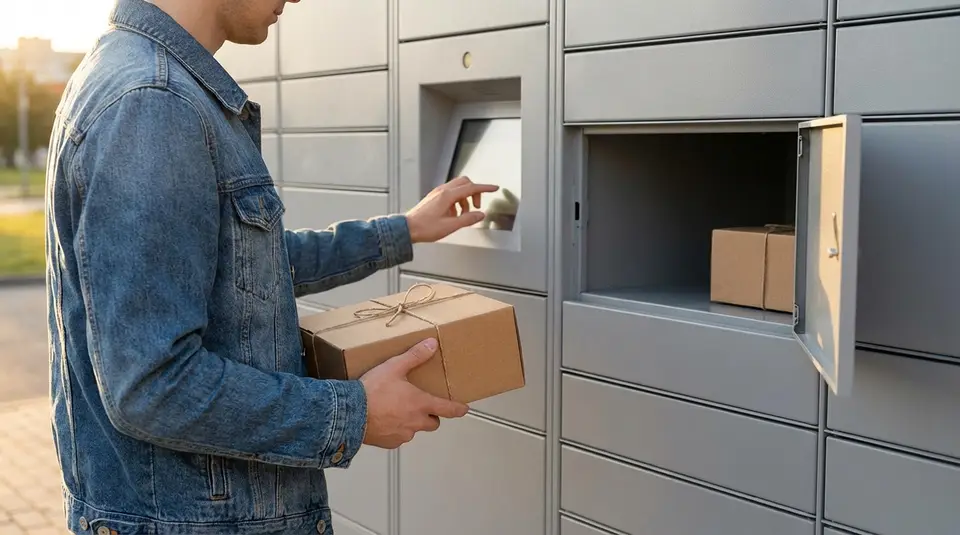
Using drop-off and parcel locker services for Etsy orders is absolutely possible and can make shipping much easier. With Etsy shipping labels, you can hand over parcels at USPS counters, USPS blue collection boxes (when size and service allow), UPS Access Point lockers, UPS® Drop Boxes, and dedicated FedEx drop-off locations, instead of waiting in long post office lines.
These options are especially handy if you ship in the evenings, work full time, or batch multiple Etsy orders at once. You can also combine Etsy labels with approved third‑party tools that support lockers and drop points in your area. In this guide, we’ll walk through when and how you can safely use a parcel locker for Etsy without risking delays or tracking issues.
Quick answer: can you use parcel lockers for Etsy orders?
Yes, you can use parcel lockers and drop‑off points for Etsy orders, as long as you are still using an approved carrier and valid tracking. Etsy cares about who is carrying the parcel, whether it was shipped on time, and if tracking works. It does not require you to hand the package to a human at a counter.
So if you drop a properly labeled Etsy package into a USPS, UPS, FedEx, or other supported carrier locker or drop box, Etsy will treat it as shipped once the carrier scans it and tracking starts updating.
The only time lockers become risky is when they delay that first scan, or when you use a locker that is not actually run by the carrier shown on your Etsy order.
How Etsy sees drop-off points, parcel lockers, and third‑party shipping
From Etsy’s point of view, shipping is a chain of data:
- an order has a ship‑by date
- a carrier and tracking number are attached
- the carrier shows scan events that prove you handed it over and it moved through the network
Etsy’s policies talk about carriers and shipping partners, not about where you hand the parcel to them. Lockers, blue boxes, Access Points, and staffed counters are all just different ways of giving your package to the same carrier.
Third‑party shipping software is a bit different. Since October 2024, Etsy only lets new US sellers use a small set of apps (like ShipStation and Shippo) for fully automated label and tracking sync. Other tools can still be used, but you may need to paste tracking into Etsy manually.
So:
- Carrier‑owned lockers and drop boxes (USPS, UPS, FedEx, etc.): Etsy is fine with these.
- Third‑party shipping apps: allowed, but only some can auto‑sync tracking for new US shops.
- Random locker networks that re‑label and forward parcels: allowed only if you still use a supported carrier and add correct tracking to Etsy.
When using a locker is totally fine (and when it’s not)
Using a parcel locker for Etsy orders is usually safe when:
- The locker belongs to the same carrier shown on your Etsy label (for example, USPS parcel locker for a USPS label, UPS Access Point for a UPS label).
- Your package fits the locker’s size rules and is labeled clearly.
- The locker or drop box feeds into a regular pickup route, so your parcel gets its first scan quickly.
- You can still prove you dropped it off (app confirmation, email, or at least a photo of it in the locker).
You should avoid or be extra cautious with lockers when:
- The locker is run by a different company than the carrier on your label, and that company puts its own label on top. This can confuse tracking and make it look like you used the wrong carrier.
- You are shipping a high‑value or time‑sensitive order where you really want a counter receipt and a clear “Acceptance” scan.
- The locker is often full, has pickup delays, or has a history of missing parcels in your area.
In short: Etsy is fine with parcel lockers as long as the carrier, tracking, and timing line up. Treat lockers as a convenience tool, not a shortcut around good shipping practices.
How Etsy shipping works behind the scenes
Etsy shipping looks simple to buyers, but there is a lot happening in the background. Etsy is mainly tracking three things: which carrier you used, whether there is valid tracking, and if you handed the parcel to the carrier by your promised ship date. How you buy the postage (Etsy label, carrier website, locker app, or post office counter) is secondary as long as those three pieces line up correctly.
Shipping with Etsy labels vs buying postage elsewhere
When you buy an Etsy shipping label, Etsy:
- Knows exactly which carrier and service you chose.
- Automatically attaches the tracking number to the order.
- Uses the label’s ship date to trigger the “your order is on the way” email to the buyer.
This makes Etsy labels very “plug and play” and they tend to help your Star Seller shipping score, because Etsy can clearly see that you shipped on time with tracking.
If you buy postage elsewhere (USPS.com, UPS, a locker app, or a third‑party shipping tool), you simply:
- Mark the order complete on Etsy.
- Enter the tracking number and choose the correct carrier.
Functionally, Etsy treats both methods the same once tracking is attached. The main difference is convenience and how much Etsy can “see” automatically.
What really matters to Etsy: carrier, tracking, and ship date
Behind the scenes, Etsy cares about:
- Ship date – the date you say you will hand the parcel to the carrier. This must match when you actually drop it off, because Etsy uses it to notify the buyer and to judge if you shipped on time.
- Tracking with the right carrier – Etsy expects a valid tracking number that belongs to the carrier you selected in the order. This is required for US sellers on almost all physical orders and is a key part of Star Seller shipping metrics.
- Scan events – Etsy looks for a first carrier scan around your ship‑by date and later delivery scans to help with things like Purchase Protection and dispute resolution.
As long as those pieces line up, Etsy does not mind if the package started its journey at a counter, a pickup, or a parcel locker.
How “handing the parcel to the carrier” is interpreted when you use lockers
Etsy’s language about “handing the order over to the shipping carrier” simply means the moment the package is in the carrier’s control: you have no more access to it, and they are responsible for moving it.
When you use a carrier‑run locker or drop box (for example, a USPS blue box, a UPS Access Point locker, or a FedEx drop box):
- Dropping the parcel into that locker counts as handing it to the carrier, as long as the locker is an official drop‑off for the service on your label.
- Your Etsy ship date should match the calendar day you place it in the locker.
- The first scan might happen later at the sorting facility, but Etsy will still treat the order as shipped on time if you dropped it off by your ship‑by date and the tracking shows normal movement afterward.
If you use a third‑party locker that only forwards parcels to a carrier later, Etsy still looks at when the carrier actually receives and scans the package. In that case, set your ship date to match the day the parcel is picked up by the carrier, not just when you placed it in the locker, to keep your metrics and buyer expectations accurate.
Using USPS self‑service kiosks and blue boxes for Etsy
Can I drop Etsy USPS packages in a blue collection box?
Yes, you can drop many Etsy USPS packages in a blue collection box, as long as they meet USPS rules and fit safely inside the slot. For Etsy orders, the key is that your package already has a valid USPS label with paid postage and a scannable barcode.
Blue boxes are usually fine when:
- The parcel is small and light enough to fit easily.
- You are using services that USPS allows in collection boxes, such as First‑Class Package, Ground Advantage, or Priority Mail in smaller sizes.
- You do not need a physical acceptance receipt from the counter that day.
Avoid putting very thick, heavy, or overstuffed Etsy packages in a blue box. If the package jams the chute or looks like it might, take it to the counter instead. Also, if your buyer paid for a faster service and the pickup time for that box has already passed, it is safer to go inside so it gets processed sooner.
When you should go to the counter instead of a box
For some Etsy shipments, the counter is the better choice. Go inside and hand the parcel to a clerk when:
- You need an acceptance scan right away for tracking or for Etsy Purchase Protection.
- The package includes customs forms for an international order.
- You are shipping something close to the size or weight limits for that service.
- The label looks smudged, wrinkled, or you had to tape over it and want to be sure it scans.
A quick counter drop‑off can prevent headaches later if a buyer opens a “not received” case and Etsy checks your tracking history.
Using USPS self‑service kiosks for labels and drop‑off
USPS self‑service kiosks can work nicely with Etsy orders, especially if you ship at odd hours. You have two main ways to use them:
- Label already bought on Etsy
- Pack your order and attach the Etsy USPS label.
- At the kiosk, you can weigh the parcel to confirm it matches what you entered on Etsy.
- If everything looks good, simply drop the package in the kiosk bin or the nearby slot. Some kiosks let you scan the barcode so you get an acceptance scan sooner.
- Buying postage at the kiosk instead of Etsy
- Pack the order and bring it to the kiosk.
- Use the screen to choose the right USPS service and print a label.
- After you pay, stick the label on firmly and drop the parcel in the bin.
- Back on Etsy, add the tracking number from the kiosk label to the order so Etsy and your buyer can see updates.
Kiosks are great when the line is long or the counter is closed, but still treat them like any other drop‑off: make sure the label is clear, the package is secure, and the service you chose matches what you promised the buyer.
Using UPS Access Point, FedEx drop boxes, and other carrier lockers
How UPS Access Point works with Etsy shipping labels
You can use UPS Access Point locations for Etsy orders, and Etsy actually lists them as a normal drop‑off option for UPS labels. When you buy a UPS label through Etsy (including UPS Ground Saver), it is a standard UPS label that can be handed over at:
- UPS Access Point locations
- UPS Stores and many partner retailers
- UPS drop boxes, as long as the package fits and the service is accepted
For Etsy, what matters is that:
- The label is valid for the UPS service you chose.
- The package gets its first UPS scan.
Dropping at an Access Point is treated the same as dropping at a UPS counter once the barcode is scanned. If the locker or store gives you a receipt or digital confirmation, keep it until tracking shows “Accepted” or “Origin scan.”
If you bought your UPS label through a third‑party app (like Shippo or ShipStation), you can still use UPS Access Point in the same way, as long as the label itself is a normal UPS label and the service allows Access Point drop‑off. Etsy does not care where you printed the label; it only cares that the tracking number you enter matches the carrier and service you actually used.
Using FedEx drop boxes and staffed locations for Etsy orders
FedEx drop boxes work fine for Etsy orders too, as long as:
- Your package fits the size limits (most boxes accept up to about 20 x 12 x 6 inches).
- The service on your label is one that FedEx allows in drop boxes (typically many Express and some Ground Economy packages).
You can:
- Print a FedEx label from Etsy (if available in your region) or from a third‑party shipping tool.
- Attach it securely, then place the parcel in a FedEx drop box before the posted pickup time.
Once FedEx collects the box and scans your parcel, Etsy will see normal tracking events. If you need a same‑day acceptance scan for time‑sensitive orders, a staffed FedEx Office or FedEx Ship Center is usually safer than a box, because they can scan the package in front of you and give a receipt.
Staffed locations are also better when:
- The package is close to the size or weight limits.
- You are shipping internationally or with special services.
- You have had issues with late first scans from a particular drop box.
Again, Etsy only sees “FedEx tracking number X was accepted on this date,” not whether it came from a box or a counter.
Amazon, InPost, and other “non‑carrier” lockers: what’s allowed?
This is where things get a bit trickier. Lockers like Amazon Locker or InPost are usually delivery networks or consolidators, not the final carrier themselves. They often hand parcels to USPS, UPS, FedEx, or regional couriers behind the scenes.
Etsy’s current rules say:
- You may use third‑party shipping providers, but only certain integrated partners (like Shippo and ShipStation in the US) can automatically sync addresses and tracking. Others require you to enter tracking and mark orders as shipped manually.
- You must still follow the carrier’s and provider’s terms, and you are responsible for correct tracking and safe delivery.
So, using a non‑carrier locker is usually allowed if:
- The service gives you a proper tracking number from a recognized carrier (for example, USPS, UPS, FedEx, DHL, or a well‑known regional courier).
- You choose that same carrier when you add tracking on Etsy, or select “Other” and paste the full tracking link if the carrier is not listed.
- The locker service is being used as a drop‑off point, not as the “recipient address” for your buyer unless they explicitly chose that option and it is supported in their country.
What you should avoid is:
- Using an Amazon return locker or a buyer’s personal locker account in a way that hides the real carrier or prevents you from getting a normal tracking number.
- Any locker service that does not provide end‑to‑end tracking that Etsy and the buyer can see.
If the locker network clearly hands off to a major carrier and you get a standard tracking number, Etsy treats it just like dropping your parcel at a post office or carrier store. The key is always the same: valid label, correct carrier selection on Etsy, and a clean first scan.
Can you use third‑party parcel locker networks for Etsy?
Yes, you can use third‑party parcel locker networks for Etsy orders, but there are two separate questions to keep in mind:
- Is the shipping software / service allowed and properly connected to Etsy?
- Is the locker itself just a drop‑off point for a normal carrier label (like USPS, UPS, FedEx), or is it a standalone delivery network?
If the locker is simply a convenient drop‑off for a major carrier whose label you bought through an approved service, Etsy is usually fine with it. If the locker is part of a separate delivery network that never hands off to a recognized carrier, things get trickier for tracking and protections.
What Etsy says about third‑party shipping providers
Etsy officially supports a short list of third‑party shipping providers that can fully integrate with your shop. For US sellers, as of October 21, 2024, only Shippo and ShipStation are allowed to automatically sync shipping data (addresses, tracking, and “marked as shipped” status) between Etsy and the provider.
You can still connect other apps, but they will not get full access to shipping details. That means with non‑approved tools you may need to:
- Copy addresses manually
- Paste tracking numbers back into Etsy yourself
- Manually mark orders as shipped
Etsy’s rules here are about data integration, not about where you physically drop the parcel. As long as the order has valid tracking from a recognized carrier and you enter it correctly, Etsy does not mind that you used a locker as the hand‑off point.
Examples: using ShipStation, Shippo, or local locker partners
If you are in the United States, Shippo and ShipStation are the “official” third‑party shipping providers that can still fully talk to Etsy.
In practice, that usually looks like this:
- You buy a USPS, UPS, or FedEx label in Shippo or ShipStation.
- You drop the package at a carrier‑run locker or partner location that accepts that carrier’s parcels.
- The carrier collects from the locker, scans the label, and tracking flows back through Shippo/ShipStation into Etsy.
Some regions also have local shipping platforms that include access to locker networks (for example, European services that connect to InPost or similar). Etsy’s help docs list which third‑party providers are officially supported in each country, and those partners often bundle lockers, couriers, and post offices into one interface.
If you use a provider that is not on Etsy’s approved list for your country, you can usually still:
- Buy labels
- Use lockers linked to those labels
- Then manually add the tracking number to Etsy
You just lose the automatic syncing convenience.
How to choose the right service based on your location
When you are deciding which third‑party parcel locker network or shipping app to use with Etsy, work through these steps:
-
Start with Etsy’s approved list for your country. For US sellers, that means Shippo or ShipStation if you want automatic import/export of shipping data. Other countries have their own official partners.
-
Check which carriers and lockers they support. Look for services that let you buy labels for the carriers you actually have lockers for nearby (for example, USPS at a grocery‑store kiosk, UPS Access Point lockers, or FedEx drop boxes).
-
Confirm that the locker is a drop‑off for a major carrier. If the locker ultimately hands the parcel to USPS, UPS, FedEx, or another recognized carrier with standard tracking, you are usually safe. If it is a closed, app‑only network with its own internal tracking that does not show up on carrier sites, it may not satisfy Etsy’s tracking expectations.
-
Think about how much manual work you are willing to do.
- Want everything to sync automatically? Stick to Etsy’s approved providers for your region.
- Comfortable with copying and pasting tracking numbers? You can use other shipping tools or local locker partners, as long as they give you a valid tracking link and carrier.
- Prioritize reliable tracking over fancy locker features. For Etsy, the most important thing is that the order has clear, verifiable tracking events from a recognized carrier. That is what supports your Star Seller metrics and eligibility for Etsy Purchase Protection, not which locker you used on the way.
If you keep those points in mind, you can absolutely mix Etsy, third‑party shipping providers, and parcel lockers in a way that is both convenient for you and fully compliant with Etsy’s rules.
Step‑by‑step: shipping an Etsy order via a parcel locker
Preparing the parcel so lockers accept it (size, label, packaging)
Start by checking the size limits for the specific parcel locker or drop box you plan to use. Most carrier lockers and boxes only accept small to medium parcels, and they often have a maximum thickness. If your Etsy order is bulky, fragile, or heavy, plan on a staffed counter instead.
Use a sturdy box or padded mailer that will not snag on the locker mechanism. Seal every opening with packing tape, not just the center seam. Avoid string, loose ribbons, or anything that can get caught. If you are reusing a box, remove or fully cover old barcodes and addresses so the scanner only “sees” the current label.
Print your shipping label at high quality, on plain white paper or a proper label sheet. Make sure:
- The barcode is flat, not wrinkled or on a corner.
- The label is on the largest, flattest side of the parcel.
- Clear tape does not create heavy glare over the barcode (a light layer is usually fine).
Before you leave, quickly compare the label to your Etsy order: correct buyer name, address, carrier, and service. This prevents mismatches that can confuse tracking later.
Dropping off at the locker and getting proof of acceptance
At the locker, follow the on‑screen steps or app instructions. If you are using a carrier locker or drop box that scans barcodes, hold the label steady until it beeps or confirms the code. For QR‑code drop‑offs, keep your phone brightness high and screen clean so the scanner reads it quickly.
Always try to get some form of proof that you handed the parcel to the carrier system. Depending on the locker, that might be:
- A printed receipt.
- A confirmation screen in the app.
- An email or push notification saying the parcel was accepted.
Take a quick photo of the parcel in front of the locker with the open door or screen visible, especially for higher‑value Etsy orders. It is simple “just in case” evidence if tracking is slow to update.
If the locker is full or rejects the size, do not force it. Choose another locker, a staffed counter, or schedule a pickup so the package is not left unsecured.
Adding and double‑checking tracking on Etsy
If you bought an Etsy shipping label, tracking should attach to the order automatically. After drop‑off, open your Orders page and confirm that:
- The order shows as Shipped.
- The tracking number and carrier match the label you used.
If you bought postage outside Etsy, copy the tracking number from your label or receipt and paste it into the order’s shipping details. Select the correct carrier so Etsy can read the scan events.
After a few hours, check that the first carrier scan appears on the tracking page. If it still shows only “Label created” by the next business day, keep your locker receipt or photo handy and be ready to share it with the buyer if they ask. This small habit keeps your Etsy shipping metrics and customer trust in great shape.
Tracking, scan events, and Etsy protections when using lockers
Why the first carrier scan is critical for Etsy Purchase Protection
For Etsy, the first carrier scan is what proves you actually shipped the order on time. It is the event where USPS, UPS, FedEx, or another approved carrier first acknowledges they have the parcel in their system.
Etsy Purchase Protection for sellers usually requires:
- A valid tracking number from an approved carrier
- A scan that shows the package was accepted or in transit
- A ship date that matches or is before your Etsy “ship by” date
When you use a parcel locker, the clock does not start when you close the locker door. It starts when the carrier empties the locker and performs that first scan. If that scan happens after your ship‑by date, Etsy may treat the order as shipped late, even if you dropped it in the locker earlier.
To stay safe, try to:
- Drop off earlier in the day, before the last pickup time
- Use lockers that clearly state pickup times or collection schedules
- Keep any locker receipt, QR confirmation, or photo of the drop‑off as backup evidence
What to do if the locker drop‑off doesn’t show tracking updates
Sometimes a parcel sits in a locker for a while or the first scan is delayed. If tracking still shows “label created” or “pre‑shipment” after a reasonable time:
-
Check pickup times Look up when that locker or location is collected. If you dropped off after the last pickup, the scan may not appear until the next business day.
-
Wait one full business day, then act If there is still no movement after the next business day, contact the carrier with the tracking number and locker location. Ask if the parcel has been collected or if there are known delays.
-
Add a note for the buyer Send a short, calm message explaining that the package has been dropped off, the carrier is still processing it, and you are monitoring tracking. Buyers usually relax when they know you are on it.
-
Gather proof of drop‑off Save screenshots of the tracking page, locker confirmation emails or app screens, and any receipts. If a case is opened, this can help show Etsy that you did ship.
If tracking never updates and the parcel is considered lost, Etsy may step in based on their Purchase Protection rules, but having clear proof that you shipped on time gives you the best chance of coverage.
How parcel lockers affect your Star Seller shipping score
Your Star Seller shipping score is based on how many orders:
- Are shipped on time
- Include valid tracking
- Show carrier scans that confirm shipment
Parcel lockers can help your score if they make it easier for you to ship quickly and consistently. They can hurt it if:
- You drop off right at (or after) the last pickup and the first scan posts late
- You use a locker that does not reliably generate timely scans
- You forget to add tracking to the Etsy order when you buy postage outside Etsy
To keep your Star Seller metrics happy when using lockers:
- Aim to drop off at least one business day before the ship‑by deadline
- Prefer lockers and drop‑off points that you know get frequent, reliable pickups
- Always double‑check that the tracking number on the label matches the one on the Etsy order
- Avoid changing carriers at the last minute; Etsy expects the carrier you selected to match the tracking you provide
Used thoughtfully, parcel lockers are perfectly compatible with Etsy Purchase Protection and Star Seller. The key is simple: get that first carrier scan early, keep your tracking clean, and save proof of every drop‑off.
Common problems with parcel lockers on Etsy orders (and easy fixes)
Locker full, QR code errors, or label mis‑reads
Parcel lockers are handy until the screen flashes an error at you. Most issues fall into three buckets: no space, code problems, or label reading trouble.
If the locker is full, the machine will usually tell you right away. The simplest fix is to:
- Try another nearby locker for the same carrier (for example, another UPS Access Point or FedEx drop box).
- If that is not possible, go to a staffed counter so the parcel is accepted and scanned that day. This protects your ship‑by date and tracking.
QR code errors often happen when the screen is dirty, the phone brightness is low, or the code is cropped in a screenshot. Turn your brightness up, zoom the QR so it fills the scanner area, and avoid cracked screen protectors over the code. If it still fails, most locker systems let you type a numeric code instead. When nothing works, switch to a staffed drop‑off so you are not stuck.
For label mis‑reads, check three things before you walk away: the label is flat, not on a corner, and the barcode is not covered by tape glare or dark patterns in your packaging. If the locker keeps rejecting the parcel, peel the label off and re‑stick it on a smoother area, or reprint the label. When in doubt, hand it to a clerk and ask them to confirm the barcode scans.
A quick habit that saves headaches: after every locker drop, wait a few seconds to see the “accepted” or “parcel received” message and keep any receipt, email, or in‑app confirmation as proof.
Wrong carrier selected on Etsy vs label/carrier you actually used
This one is easy to do and can quietly break your tracking. If you choose USPS on Etsy but buy a UPS label and drop it in a UPS locker, Etsy will show the wrong carrier. That can delay tracking updates and confuse buyers.
If you realize the mistake before shipping, edit the order’s shipping details so the carrier matches the label you are about to use. Then add the correct tracking number.
If you notice it after drop‑off, do not cancel the label. Instead:
- Go to the order on Etsy.
- Add or edit the tracking info.
- Select the correct carrier from the list and save.
The goal is simple: Etsy’s carrier field, the tracking number, and the locker’s carrier must all match. When they line up, scans flow correctly and Etsy can see that you shipped on time.
If you used a third‑party postage service that is not directly integrated, just choose the underlying carrier (for example, USPS, UPS, FedEx) and paste the tracking number they gave you. The fact that you dropped it at a locker does not matter to Etsy as long as the carrier and tracking are right.
Parcels stuck, missing, or returned from a locker drop‑off
Sometimes a parcel seems to vanish after you leave it in a locker. The first thing to check is tracking events:
- If there is no movement 24–48 hours after drop‑off, contact the carrier with the tracking number and the locker location. Many carriers can see internal scans that are not public yet and may be able to nudge the parcel along.
- If tracking shows “return to sender” or “unable to collect from locker,” it usually means the driver could not access the locker in time or the parcel did not meet size or service rules. In that case, inspect the returned package, confirm the address and service level, and resend it from a staffed counter so it gets a clear acceptance scan.
When a parcel appears stuck in transit, keep your buyer in the loop. Share screenshots of tracking, give them an estimated update time, and open an investigation with the carrier if the parcel has not moved for several business days.
If the item is lost and the carrier confirms it, follow your usual process: refund or replace for the buyer, then file a claim if your service included insurance. For future orders, consider:
- Using lockers only for services that clearly allow them.
- Avoiding lockers for very high‑value or time‑sensitive shipments.
- Keeping every locker receipt or confirmation email until the order is delivered.
With a bit of checking at drop‑off and quick action when something looks off, parcel lockers can stay a time‑saver instead of a stress source for your Etsy shop.
Best practices to safely use lockers for Etsy shipping
When lockers save you time vs when to avoid them
Parcel lockers are amazing when you already know your carrier and service, your package fits the locker limits, and you do not need special handling. They shine for: quick evening drop‑offs, contactless shipping, and skipping long post office lines, especially when you have prepaid labels from Etsy or a carrier site.
You should avoid lockers when:
- The package is oversized, oddly shaped, or very heavy.
- You are shipping high‑value or fragile items that you want a counter acceptance receipt for.
- You are close to a ship‑by deadline and absolutely need a same‑day acceptance scan.
- The service you bought requires handing the parcel to a staffed location (for example, some international or hazmat services).
If you are ever unsure, choose a staffed counter or carrier pickup instead of a locker. A few extra minutes can protect your tracking, your money, and your shop metrics.
Simple rules to keep your shipping metrics happy
Think of these as your “locker safety rules” for Etsy:
- Match carrier to label. If Etsy says USPS, drop it with USPS; if it is a UPS or FedEx label, use their lockers or staffed locations only.
- Drop off by the ship‑by date. Aim to use the locker at least a few hours before the end of the handling time you set in Etsy, so the first scan is likely to happen on time.
- Keep proof of drop‑off. Take a clear photo of the parcel in the locker or the locker screen, and save any email or app confirmation. This helps if tracking is slow to update.
- Avoid cutting it close on weekends and holidays. Lockers may accept parcels, but the first physical scan can be delayed, which can hurt your on‑time shipping stats.
- Use lockers for “easy” shipments. Standard domestic parcels, sturdy packaging, and moderate value are ideal. For anything risky or time‑critical, go to the counter.
Following these simple habits makes it much more likely that your tracking shows on‑time acceptance, which supports both Etsy protections and your Star Seller shipping score.
Sample workflow for mixing home pickup, counters, and lockers
Here is a practical way to blend all three options without stressing your Etsy metrics:
-
Daily or every other day:
-
Pack orders at home, print Etsy labels, and sort them into three piles:
-
“Locker‑friendly” (standard, low‑risk parcels).
-
“Counter” (fragile, high‑value, international, or deadline‑tight orders).
-
“Pickup” (larger batches or heavy boxes).
-
Locker run:
-
On your way out, drop the locker‑friendly pile at a carrier locker that matches the labels. Snap a quick photo of the locker screen or compartment.
-
Counter stop (2–3 times a week or when needed):
-
Take the counter pile to USPS, UPS, or FedEx and ask for an acceptance receipt or at least watch for the first scan in tracking later that day.
-
Scheduled pickup for bulk days:
-
When you have many parcels, schedule a carrier pickup from home using the same carrier as your Etsy labels. Group them by service and leave a clear note for the driver.
This mixed approach lets you enjoy the convenience of parcel lockers while still giving your most important Etsy orders the extra care of a counter drop‑off or home pickup.
Related posts
Keep reading
How to Offer Local Pickup on Etsy
Learn step‑by‑step how to offer local pickup on Etsy, set clear policies, use coupon codes, protect Star Seller stats, and keep in‑person handoffs safe.
What to Do When a Package Is Lost in Transit (Etsy Seller Guide)
Lost Etsy package? Stay calm and delight buyers with clear communication, carrier claims, Etsy Purchase Protection, smart refunds, and proactive shipping safeguards.
How to Cancel an Etsy Order as a Seller
Learn how to cancel an Etsy order as a seller step‑by‑step, issue full or partial refunds, avoid policy violations, and keep buyers happy with clear communication.
How to Avoid Underpaying Postage on Etsy Orders
Stop surprise USPS adjustments and postage-due notices with accurate Etsy shipping profiles, correct package weights, dimensions, zones, and tracking every time.
Dimensional Weight: What Etsy Sellers Need to Know
Learn how dimensional weight affects Etsy shipping costs, packaging, and pricing so you protect profits, reduce fees, and delight customers on every order.
Best Packaging Supplies for Etsy Sellers
Discover budget-friendly, eco-friendly Etsy packaging supplies—cute mailers, custom boxes, tissue, stickers, and inserts that protect products and delight buyers.