
How to Use Personalization Fields to Increase Etsy Conversions

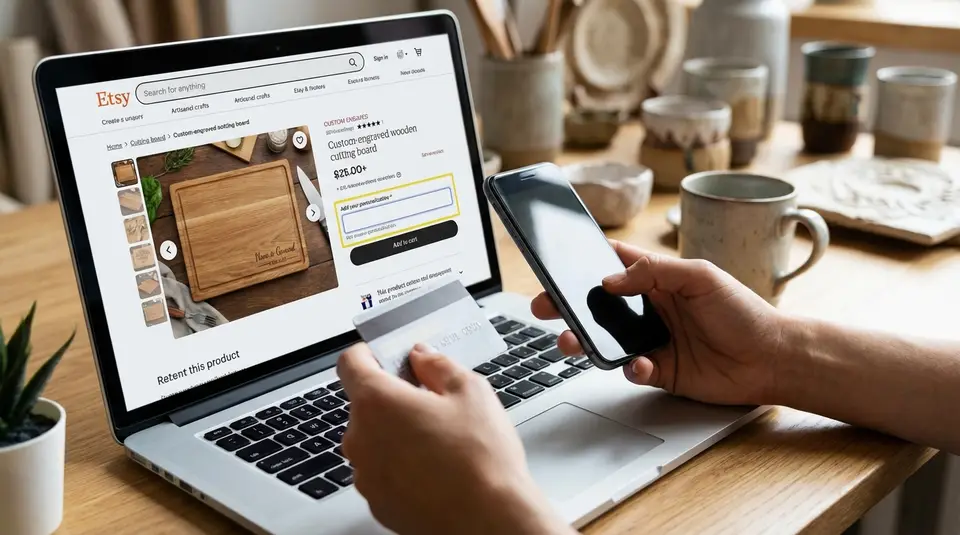
Personalization fields are the built-in spot on an Etsy listing where shoppers enter the exact details you need before they can check out. Used well, they turn customization questions into confident purchases by capturing essentials like name spelling, dates, or a font choice in a simple, structured way. Keep friction low by asking for one detail per field, giving a clear example of the format you want, and setting a reasonable character limit so buyers cannot accidentally paste a paragraph. Decide upfront whether the input must be required, because the most common conversion killer is wording that feels vague and risky to the buyer.
Personalization field on Etsy listings: where to turn it on
Enable personalization in a listing editor
In your Etsy Shop Manager, open Listings, select the listing you want to edit, then scroll to the Inventory and pricing area and toggle Personalization to On. Etsy will show an Instructions for buyers box where you can tell shoppers exactly what to type (for example, “Name for engraving” or “Initials in this order: First, Last”). Etsy also lets you enable personalization in bulk using the Listings bulk editor, which is handy if you’re updating a whole section at once.
If you are in Etsy’s newer personalization experience (some sellers see this as a test), you may be able to add multiple personalization fields and even set character limits per field. Etsy has shared more about this direction in the Etsy Seller Handbook.
Make personalization required vs optional
Treat “required” as your default when you truly cannot start the order without the buyer’s input (name spelling, date, pet breed, etc.). This reduces back-and-forth messages and prevents production delays.
Make personalization optional when it’s a nice-to-have add-on (like “gift note text”) or when most buyers choose “no customization.” Optional works best when your listing still makes sense with blank personalization, and you can fulfill it without guessing.
When variations are a better fit than personalization
Use variations when the buyer is selecting from known choices that change what you make or ship, like size, color, material, or finish. Variations also help when price or inventory changes by option, since Etsy can track quantity per variation.
Use the personalization field when the buyer must enter unique text (names, dates, short phrases) or specific instructions that do not fit neatly into a fixed dropdown. In many high-converting Etsy listings, variations handle the “what version,” and personalization captures the “exact wording.”
Personalization field settings that reduce buyer mistakes
Character limits and formatting rules
Buyer mistakes usually come from two things: too much freedom, or unclear formatting. Start by setting a tight character limit that matches what you can actually fit on the product. Etsy’s personalization instructions can be up to 1024 characters, and in Etsy’s newer multi-field experience you can also set a character limit per field, up to 1024. That flexibility is great, but shorter limits often convert better because buyers feel safer and you get cleaner inputs.
Then add simple formatting rules in plain language. Examples:
- “Max 12 characters. No emojis.”
- “Type EXACTLY as you want it engraved. Case-sensitive.”
- “Use commas to separate: Name, Date, Location.”
If special characters can break your process (accent marks, symbols, or punctuation), say so up front. If you can support them, say that too. Either way, remove doubt.
Clear label text buyers understand fast
Treat the label like a form field on a checkout page. It should answer “What goes here?” in under two seconds.
Good labels:
- “Name for engraving”
- “Initials (in order: First, Middle, Last)”
- “Wedding date (MM/DD/YYYY)”
Avoid labels like “Personalization” or “Custom text” by themselves. They are vague and they invite abandoned carts or follow-up messages. Etsy’s own guidance on personalized listings reinforces the value of clear, specific instructions in the listing editor, especially when personalization is required. You can review the current steps in How to Offer Personalized Listings.
Examples of good personalization prompts
- “Enter the name to print (Example: Olivia).”
- “Type initials in order: First, Last (Example: JH).”
- “Line 1 (max 10): _____ | Line 2 (max 12): _____.”
- “If you want no name, type: NONE.”
Buyer instructions that increase completed personalization details
What to ask for in the personalization box
Ask only for details you will actually use to make the item. Extra questions feel like work, and on Etsy that can slow a buyer down right when they are ready to purchase. If you need multiple pieces of info, keep them in a simple order and show the buyer the format.
A strong personalization prompt usually includes:
- What you need (name, initials, date, color choice if not in variations).
- The exact order you want it in.
- A short example that mirrors the format.
- A fallback if they want it blank (for example, “Type NONE”).
If something belongs in variations (size, finish, quantity), do not ask for it again in personalization. Repeating questions creates contradictions, and contradictions create messages and cancellations.
Handling initials, dates, and special characters
Initials are a classic error point because buyers do not agree on the order. Spell it out. “First, Last” and “First, Middle, Last” are not interchangeable, so choose one and write it in the prompt. If monograms are involved, clarify the style too (for example, “Traditional monogram: First LAST Middle”) so you do not have to guess.
Dates are another common snag. Use one format and stick to it. Many sellers use “MM/DD/YYYY” for US buyers, but if you ship internationally, consider writing the month in words to avoid confusion (for example, “January 18, 2026”).
For special characters, be direct:
- If you can engrave accent marks, say “Accents are OK (é, ñ).”
- If you cannot, say “No special symbols or emojis.”
Also tell buyers if you will copy text exactly, including capitalization. “Sarah” and “SARAH” produce very different results.
Mobile-friendly instruction wording
Most Etsy shoppers browse on mobile, so your prompt should be scannable. Keep it to one short block. Avoid long paragraphs, and put the example right after the request.
Mobile-friendly template: “Personalize: Name (max 12). Example: Olivia. If blank, type NONE.”
If you need two lines: “Line 1 (max 10): ____ / Line 2 (max 12): ____. Example: Ava / 2026.”
This kind of compact wording reduces back-and-forth, and it makes the checkout feel straightforward instead of risky.
Photos that make personalized options feel obvious and safe
Show finished examples with real names or initials
Personalization sells when buyers can picture the finished result on the first swipe. Your photos should make the custom option feel normal, not mysterious. Include at least one image that shows the product personalized with a realistic name or initials, sized and placed exactly the way you will produce it.
A few practical guidelines help a lot:
- Use common, easy-to-read examples (“Olivia,” “JH,” “The Smiths”) instead of long phrases.
- Show scale. A close-up is great, but also include a wider photo so buyers understand how big the personalization looks on the full item.
- Keep styling consistent. If you offer multiple fonts or placements, show the most popular option first, then add supporting examples.
If you are worried about privacy, avoid using real customer info. Use sample names and clearly staged photos.
Add an image explaining what to type
A simple “instruction graphic” reduces mistakes more than another lifestyle photo. Think of it like a mini form guide. One clean image can clarify what the personalization box is asking for, especially on mobile.
What works well:
- A screenshot-style layout that says “Type this in the personalization box:” followed by an example.
- A short callout for formatting, like “Initials in order: First, Last” or “Max 12 characters.”
- If capitalization matters, include a line like “We copy exactly what you type.”
Keep it visually quiet. Big text, strong contrast, and one example beat a crowded collage every time.
Avoid photo confusion across variations
Confusion happens when photos show options that do not match what the buyer selected, like a gold finish in the images while they chose silver in variations. When that happens, shoppers hesitate, and hesitation kills conversions.
To prevent it:
- Make sure each key variation (color, size, finish) has at least one photo that clearly matches it.
- If personalization placement changes by size, show both sizes with labeled callouts.
- Do not mix fonts or placements in the first photo unless your listing is specifically “choose any font/placement.”
Your goal is simple: the buyer should know exactly what they are buying and exactly what they need to type, before they ever reach the personalization field.
Listing elements that support personalization and boost conversion
First photo and listing video for custom proof
Your first photo should answer two questions instantly: “What is this?” and “Can I personalize it?” If personalization is a core selling point, show it in the hero image with a clean example (a name, initials, or date). Buyers should not have to swipe to discover that the item is custom.
If you use listing video, use it for proof. A short clip that shows the engraved or printed detail up close, plus a quick angle change for scale, builds trust fast. Keep it simple. Avoid fast edits that make the personalization hard to read. The more legible the custom detail, the safer the purchase feels.
Title and description wording for personalization
Your title should include the customization hook in plain language, like “personalized,” “custom name,” “engraved,” or “monogram.” This helps Etsy search match your listing to shoppers who already want a custom item, and it reduces clicks from buyers who do not.
In the description, repeat the essentials near the top:
- What can be personalized (name, initials, short phrase).
- Where it appears (front, back, charm, inside cover).
- Any hard limits (character count, supported symbols, capitalization rules).
- Exactly how to provide details (personalization box, variations, or message).
Then add a short “Before you checkout” line. This is where you prevent the most common errors: initials order, date format, and spelling confirmation.
Reviews and social proof for custom orders
Personalized orders feel higher-risk to buyers, because they worry about mistakes and returns. Reviews reduce that risk, but only if shoppers can quickly find proof that customization goes smoothly.
A few ways to make reviews work harder:
- Pull a short quote into a listing photo graphic (for example, “The name came out perfect”), if it reflects real customer feedback.
- Encourage buyers, after delivery, to mention the personalized detail in their review, without pressuring them.
- When you reply to reviews, keep it specific and calm. A simple “So glad the engraving turned out just as you wanted” reassures future buyers that you pay attention.
Over time, “custom proof” becomes a conversion asset: clear images, clear instructions, and consistent reviews that confirm buyers get what they expected.
Where to find personalization requests and fulfill orders correctly
Personalization details in order receipts and messages
On Etsy, personalization details should show up right where you manage fulfillment: on the Orders page in Shop Manager. Etsy also notes that the personalization request appears in the order notification email you receive, which is helpful if you are away from your desk and need to spot-check details quickly. You can review Etsy’s current guidance in How to Offer Personalized Listings.
Messages matter too, but treat them as a backup channel. If a buyer follows up with a correction in Messages, keep your workflow simple: confirm the updated text in writing, and make sure your production notes reflect the final version you will use.
Confirming details before production
Before you start making anything, do a fast “personalization QA” pass:
- Check spelling, capitalization, and initials order against your listing rules.
- Confirm the personalization matches the option they selected (size, font, finish).
- Make sure the request fits your character limits and layout.
If anything looks off, pause production and message the buyer with a clear, yes-or-no confirmation. Avoid open-ended questions. The goal is to get an exact approved line of text you can copy into your work file without interpretation.
What to do when personalization is missing or unclear
If personalization is required but the box is blank, or the buyer typed something ambiguous (like “same as photo”), do not guess. Message the buyer with:
- what is missing, 2) the format you need, and 3) an example.
Give a simple deadline aligned with your processing time (“Reply by Tuesday, January 20, 2026, to ship on time”), and explain what you will do if they do not respond (cancel, or ship without personalization, depending on what your listing promises).
How to test and improve personalization fields over time
Simple tests for prompt wording and required settings
Treat your personalization field like a mini checkout form. Small wording changes can reduce hesitation and cut order errors.
Run simple, controlled tests, one change at a time:
- Required vs optional: If you truly cannot produce without the info, test making it required. If buyers often choose “no personalization,” test optional with a clear “Type NONE if blank” instruction.
- Prompt format: Compare a single sentence vs a format template (for example, “Name (max 12). Example: Olivia.”).
- Error-proofing line: Add one short rule like “We copy exactly what you type, including capitalization.”
Let each test run long enough to collect a meaningful number of visits and orders. If you change multiple things at once, you will not know what helped.
Tracking conversion changes and common errors
Use Etsy Shop Stats to watch conversion rate, plus the volume behind it. Conversion rate is based on orders and visits, so a big traffic spike can make results look better or worse than they really are. Etsy defines it as orders divided by visits. The full metric definitions are in the Shop Stats Glossary.
Alongside conversion, track a simple “mistake log” for two weeks:
- Missing personalization
- Wrong initials order
- Date format confusion
- Too-long text requests
- Special character issues
When one error shows up repeatedly, fix the prompt first. Then update your photo instruction graphic next.
Multilingual personalization and translation expectations
If you sell internationally, assume buyers may be reading your listing in translation. Etsy automatically translates listings for shoppers, and you can add manual translations if you are fluent. For personalization fields, keep instructions short, literal, and example-driven, since examples survive translation better than long explanations.
If a large share of your buyers speaks a second language you know well, add a brief bilingual line in the personalization instructions (one line, not a paragraph). If you do not speak the language well enough to support customers, keep the prompt simple in your default language and rely on clear formatting and examples to do the heavy lifting.
Related posts
Keep reading

How Much Money Can You Make Selling on Etsy?
Discover realistic Etsy income ranges, profit margins, fees, and proven tips to boost sales so you can grow your handmade or digital product shop confidently.

How to Break Even Faster on Etsy
Learn how to break even faster on Etsy with smart pricing, fee-cutting tactics, bestseller research, SEO-powered listings, and affordable Etsy Ads strategies.

Why Sell on Etsy? Key Benefits Explained
Discover why selling on Etsy boosts your handmade brand visibility, low startup costs, built-in traffic, loyal buyers, and flexible, low-risk income.

What Products Can You Sell on Etsy?
Discover exactly what you can sell on Etsy—from handmade crafts and digital downloads to vintage treasures and craft supplies—and start growing a joyful shop today.
Etsy Vacation Mode: When to Use It (and How to Come Back Strong)
Etsy vacation mode helps pause orders for buyers and hide listings; use a clear shop announcement and auto-reply, then relaunch with fresh listings and promos.
How to Add Variations on Etsy Without Confusing Buyers
Add variations on Etsy with clear option names, linked photos, and accurate price/stock settings so buyers choose fast and orders stay correct at checkout.